Introduction to Driver Development Kit
Empowered by the C-API solution, Driver Development Kit provides easy-to-use, secure, and diversified ArkTs-API and C APIs to elevate your experience in developing peripheral drivers, which bring ultimate plug-and-play experience to users.
When to Use
With Driver Development Kit, you can develop dedicated or extended peripheral drivers in an efficient and secure manner.
-
Develop drivers of dedicated
peripherals for bank counters, enterprise office, and medical detection, such as high-speed document scanners, ID card scanners, fingerprint scanners, and blood oxygen and blood glucose meters.
-
Develop enhanced functions of non-standard peripherals,
such as customizing handwriting pad shortcut keys, setting the pressure sensing/drawing area, setting extended enhancement capabilities, setting the mouse lighting effect, customizing mouse extended buttons, and setting DPI and X and Y axes.
Typical Use Cases
-
You can develop advanced peripheral functions to meet user requirements.
-
The extended driver framework supports lifecycle management of peripheral drivers and provides APIs for querying and binding peripheral devices.
Basic Concepts
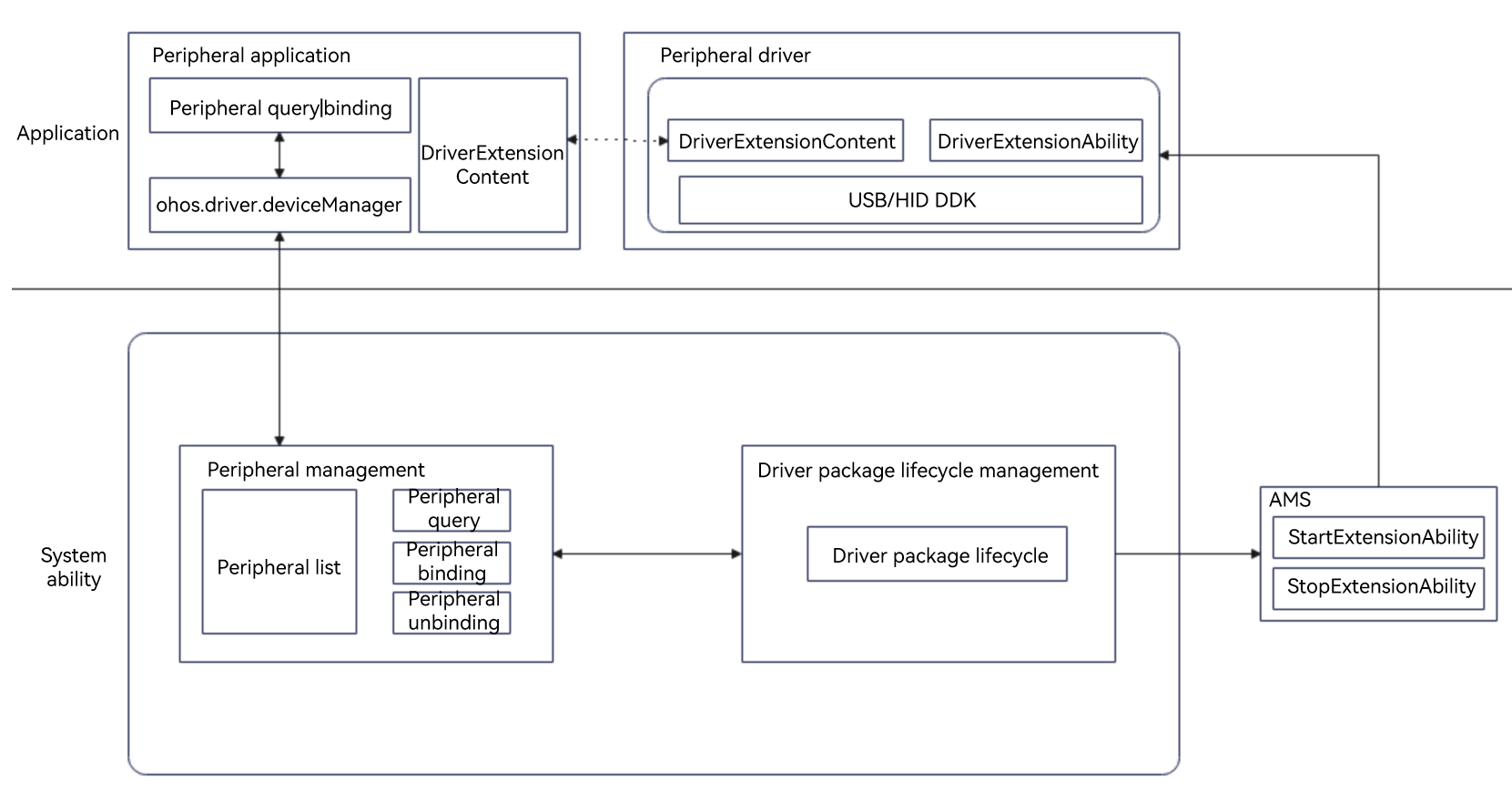
- Peripheral driver client: basic UI-based driver, which is used to query and bind drivers, and customize the communication mode and data processing mode.
- Peripheral driver: basic UI-free driver, which is the dedicated peripheral driver or enhanced peripheral driver developed based on the DDK.
- External Device Manager: performs lifecycle management of peripheral devices and driver packages.
- Bundle Manager Service (BMS): manages application installation, uninstallation, and data on the system.
- Ability Manager Service (AMS): starts and stops DriverExtensionAbility.
Implementation Principles
The HDF extended driver framework provides unified APIs for you to leverage the DDK capabilities for user-mode peripheral driver development.
External Device Manager, the core service of user-mode peripheral management, performs lifecycle management of peripherals and peripheral drivers. In addition, standard ArkTS APIs are provided to query, bind, and unbind peripherals.
Peripheral Driver Architecture
Figure 1 Peripheral driver working mechanism
Operation Process
Figure 2 shows the process for matching a peripheral driver client with a peripheral driver when a peripheral is connected.
Figure 2 Process for matching a peripheral driver client with a peripheral driver
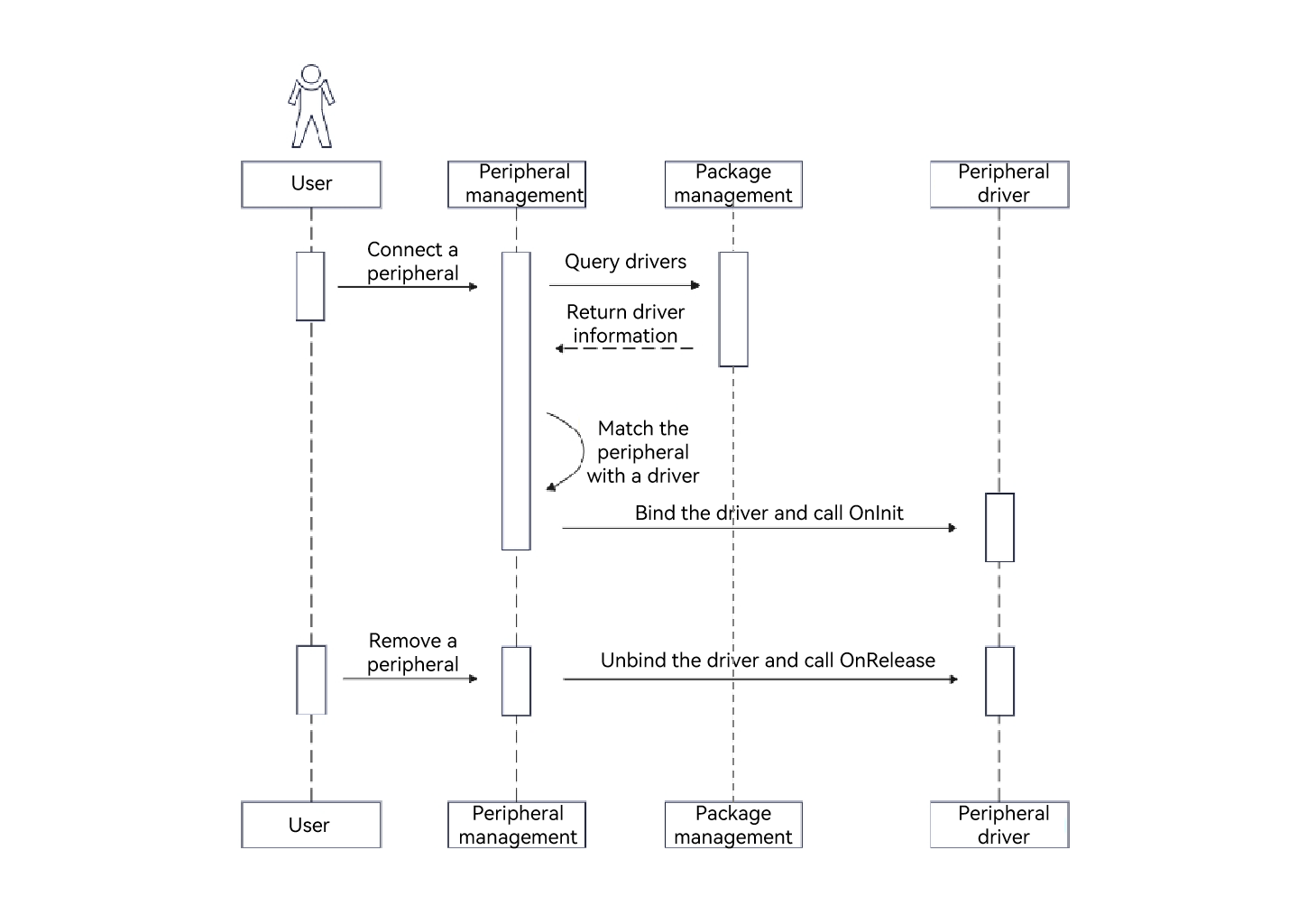
Figure 3 shows the process for binding the peripheral driver client with a peripheral driver.
Figure 3 Process of binding the peripheral driver client with a peripheral driver

Notes and Constraints
To call the ArkTs or C APIs provided by Driver Development Kit, you need to apply for specified permissions.
The following table lists the required permissions.
| API Type | DDK Type | Permission |
|---|---|---|
| ArkTs-API | NA | ohos.permission.ACCESS_EXTENSIONAL_DEVICE_DRIVER |
| C-API | USB DDK | ohos.permission.ACCESS_DDK_USB |
| C-API | HID DDK | ohos.permission.ACCESS_DDK_HID |
| C-API | USB Serial DDK | ohos.permission.ACCESS_DDK_USB_SERIAL |
| C-API | SCSI Peripheral DDK | ohos.permission.ACCESS_DDK_SCSI_PERIPHERAL |
Associated Modules
The following table lists the associated modules you may use during development of peripheral drivers.
| Name | Description |
|---|---|
| PerformanceAnalysisKit | Introduces {hilog} for log printing. |
| BasicServicesKit | Introduces {BusinessError} to capture error information. |
| IPCKit | Introduces {rpc} to implement inter-process communication between the driver and the client. |
| AbilityKit | Introduces {want} for lifecycle management. |
你可能感兴趣的鸿蒙文章
harmony 鸿蒙Driver Development Kit
harmony 鸿蒙UI-free Driver Development
harmony 鸿蒙Setting Up the Environment
harmony 鸿蒙UI-based Driver Development